
reids5.0集群搭建
三种模式:
主从: 高可用性,读写分离,M写S读。故障时无法自动切换,只能手动,master存储和写能力因机器收到瓶颈
哨兵: 实现故障发现、故障转移、配置中心、客户端通知,哨兵可以从字面理解。他会持续性监视主从之间的状态信息,当主从故障自动切换
集群: 去中心化分片集群,集群中有16384个哈希槽,每个redis实例负责一部分slot,集群中的所有信息通过节点数据交换而更新。卡槽只会分配给主节点,每个卡槽能存放多key。有利于Redis动态扩容、缩容,把缓存雪崩数据丢失的风险降到最小。
集群搭建
传送门: 安装包官方下载地址
| 主机 | 端口 | 角色 |
|---|---|---|
| 10.6.6.69 | 6379/6380 | master/slave |
| 10.6.6.70 | 6379/6380 | master/slave |
| 10.6.6.71 | 6379/6380 | master/slave |
- 以下步骤在所需节点相同,此处只演示一台节点
redis是c语言写的,下载环境
1 | [root@report-redis1 ~]# yum install lrzsz wget ftp vim cpp binutils glibc glibc-kernheaders glibc-common glibc-devel gcc make -y |
解压&&进入目录&&编译安装
1 | [root@report-redis1 ~]# tar -xf redis-5.0.0.tar.gz |
创建数据目录
1 | [root@report-redis1 redis-5.0.0]# cd /usr/local/redis/ |
处理配置文件
- ‘#‘号部分不同主机替换项
1 | [] |
复制文件到对应路径
1 | [] |
增加软连接
1 | [root@report-redis1 ~]# ln -s /usr/local/redis/bin/redis-server /usr/bin/redis-server |
启动服务
1 | [root@report-redis1 ~]# redis-server /usr/local/redis/redis-cluster/redis-6379/redis_6379.conf |
查看服务状态
1 | [root@report-redis1 ~]# ps -fe |grep redis |
初始化集群(随便某台节点操作即可)
1 |
|
集群命令
查看从主关系
1 | [root@report-redis1 ~]# redis-cli -a Gxx@123 -h 10.6.6.69 -p 6379 -c cluster nodes |

1 | [root@report-redis1 ~]# redis-cli -a Gxx@123 -h 10.6.6.69 -p 6379 -c cluster slots | xargs -n8 | awk '{print $3":"$4"->"$6":"$7}' | uniq |
数据验证
1 |
|
手动故障验证
1 |
|
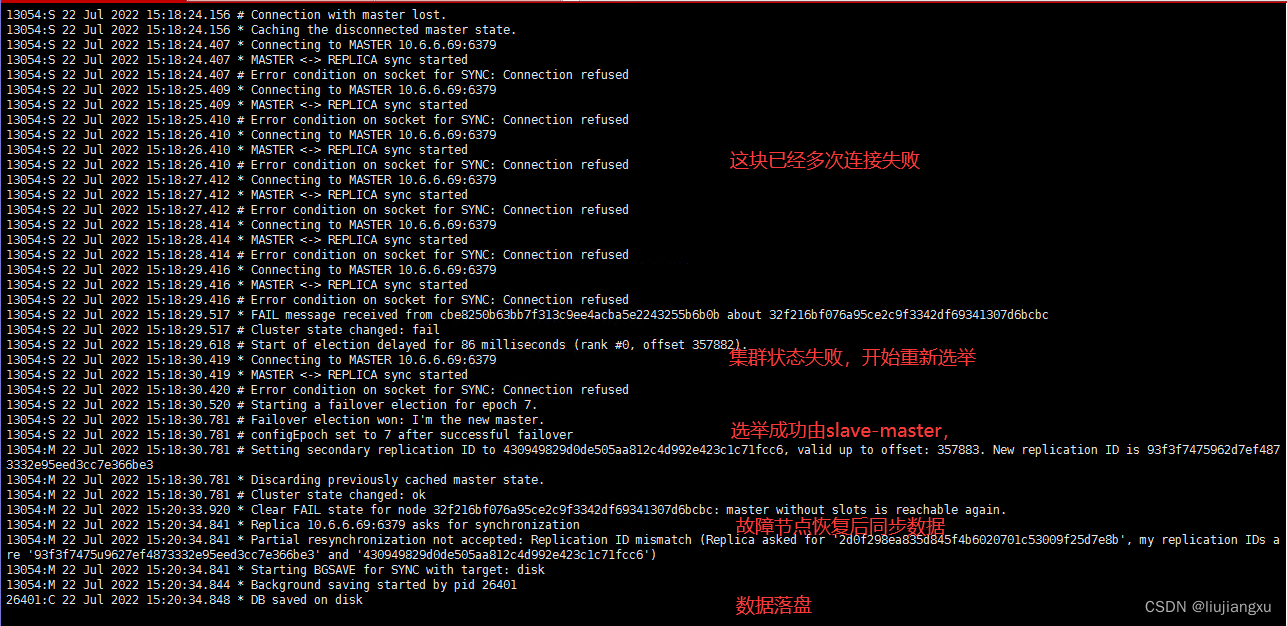
1 |
|
本博客所有文章除特别声明外,均采用 CC BY-NC-SA 4.0 许可协议。转载请注明来源 liujxu!
 wechat

相关推荐

2025-09-07
Nginx + Keepalived 实现高可用负载均衡集群
Nginx + Keepalived 高可用负载均衡集群实现Nginx 作为高性能的反向代理服务器,结合 Keepalived 实现 VIP(虚拟 IP)漂移,可以构建高可用的负载均衡集群。以下是具体实现方法: 环境准备 两台以上服务器安装 Nginx 和 Keepalived 统一的虚拟 IP(VIP),例如 10.96.4.32 所有节点配置相同的 Nginx 负载均衡规则 Nginx 负载均衡配置在每台 Nginx 服务器上配置相同的 upstream 规则,指向后端应用服务器: 1234567891011121314http { upstream backend { server 192.168.1.101:8080; server 192.168.1.102:8080; server 192.168.1.103:8080; } server { listen 80; location / { proxy_p...

2025-09-07
Nginx健康检查自定义检查路径(非根路径)
Nginx官方提供的模块中,默认没有对负载均衡后端节点健康检查模块,必须使用第三方模块以打补丁形式安装使用,所以推荐使用Tengine ngx_http_upstream_check_module该模块可以为Tengine提供主动式后端服务器健康检查的功能,1.40+以上默认开启 123456789101112131415161718upstream report { server 10.96.6.65:8080 weight=1 ; server 10.96.6.66:8080 weight=1 ; check interval=15000 rise=2 fall=3 timeout=5000 type=http; check_http_send "HEAD / HTTP/1.0\r\n\r\n"; check_http_expect_alive http_2xx http_3xx; } server { listen 80;...

2025-09-07
Nginx后端超时504重复请求
在一次业务中客户端请求osb平台再经过nginx转发后端,开发反馈请求次数大于1导致问题,经排查客户端请求一次,osb平台设置超时为30s,nginx配置等待上游服务器响应时最多等待30秒 部分配置文件1234567891011upstream xx { server 10.6.6.1:8080 weight=1; server 10.6.6.2:8080 weight=1; server 10.6.6.45:8080 weight=1; } location / { root html; proxy_pass http://xx; proxy_set_header X-Forwarded-For $remote_addr; proxy_read_timeout 30; } 123456# access.log日志10.6.6.35|18/Jun/2024:10:35:4...

2025-12-29
Nginx实现动静分离配置
在传统的 Web 架构中,如果将图片、CSS、JS 等静态资源和 API 接口请求全部交给后端的 Tomcat、SpringBoot 或 PHP 处理,会造成极大的资源浪费。因为后端服务器更擅长处理复杂的业务逻辑,而不是通过 IO 读取静态文件。 什么是动静分离? 动:动态请求(如 JSP, PHP, API 接口),交给后端应用服务器(Tomcat/uWSGI 等)处理。 静:静态资源(如 HTML, CSS, JS, Images),由 Nginx 直接从磁盘读取返回,不再经过后端。 核心优势: 减轻后端压力:后端只专注于业务逻辑,不再处理繁琐的静态文件 IO。 提升访问速度:Nginx 处理静态文件的并发能力是 Tomcat 的数倍,且配合 Gzip 和缓存,加载速度飞快。 架构示意图12345678910🌐 用户浏览器│▼🚀 Nginx (端口 80/443)│├── ⚙️ 动态分流 (匹配 /api, .jsp)│ └── ➡️ 转发至 Tomcat:8080│└── 🖼️ 静态分流 (匹配 .jpg, .css, .js) └── ...

2025-12-08
ansible启动tomcat无效
123456789101112[root@ceshi-128 playbook]# ansible-playbook tomcat.yml PLAY [all] ******************************************************************************************************************************************************************TASK [Gathering Facts] ******************************************************************************************************************************************************ok: [10.1.74.20]TASK [start tomcat] *********************************************...

2025-12-08
crontab每周一到周五
每周一到周五9点到15点每分钟执行:*/1 9-14 * * 1-5123456789Linux * * * * * - - - - - | | | | | | | | | +----- day of week (0 - 7) (Sunday=0 or 7) OR sun,mon,tue,wed,thu,fri,sat | | | +---------- month (1 - 12) OR jan,feb,mar,apr ... | | +--------------- day of month (1 - 31) | +-------------------- hour (0 - 23) +------------------------- minute (0 - 59) 字段 备注 Minutes 分(0–59) Hours 时(0–59) Day 日(1–31) ...